PolyQuest Control
PolyQuest Control turns your smartphone into a personal RPG adventure controller for RCWeb PolyQuest—complete with character class selection, 360-degree analog movement, context-aware interactions, class skills, live quest tracking, and interactive character dialogue choices!
Features
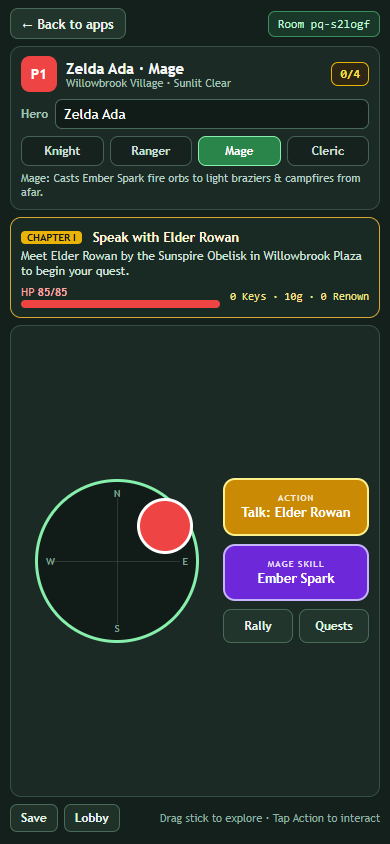
- Choose your Character Class: Tap Knight, Ranger, Mage, or Cleric in the lobby (or switch anytime!) to gain distinct abilities, appearance, and team roles.
- 360-degree analog touch joystick: Glide smoothly through meadows, forests, beaches, canyons, snowfields, caves, houses, and castle halls.
- Context-aware Action button: Automatically updates to match what is right in front of your hero—Talk, Open Chest, Unlock Door, Enter Cave, Rotate Prism, Light Brazier, Ring Chime, Herd Chicken, or Read Lore Stone.
- Dedicated Class Skill button: Trigger Aegis Bash (Knight), Sunbolt Arrow (Ranger), Ember Spark (Mage), or Sanctuary Hymn (Cleric) with live cooldown feedback.
- Interactive Dialogue & Fable Choices: Read NPC conversations and Lore Obelisks right in your hand and tap story choices to earn Heroic Renown or Gold.
- Live Quest Banner & Satchel: Keep your current Main Quest objective, Side Quests drawer, Keys, Aether Relics (
0/4), Gold, Renown, and HP right on your screen, plus Rally and Save buttons. - Custom Hero Name: Your name is saved across RCWeb apps under your device preferences without losing your hero slot or class.
How to use
- Scan the QR code on the PolyQuest display (or launch PolyQuest from Back to apps).
- Enter your Hero name, choose your Class, and tap Begin Adventure (or Resume Adventure to continue a saved game).
- Drag the left analog stick to explore Eldervale with up to 5 teammates.
- Tap the glowing Action button to talk to townsfolk, solve puzzles, and open doors, and use your Class Skill to help your team.
- Tap Back to apps at the top left to return to the RCWeb App Launchpad on your phone without interrupting the shared display.